
Knowledge base › SSL & security
How to get the free SSL certificate (padlock)
Every website on Hosteran gets a free SSL certificate automatically. Here’s how to check it.
- 1
Open SSL/TLS Certificates
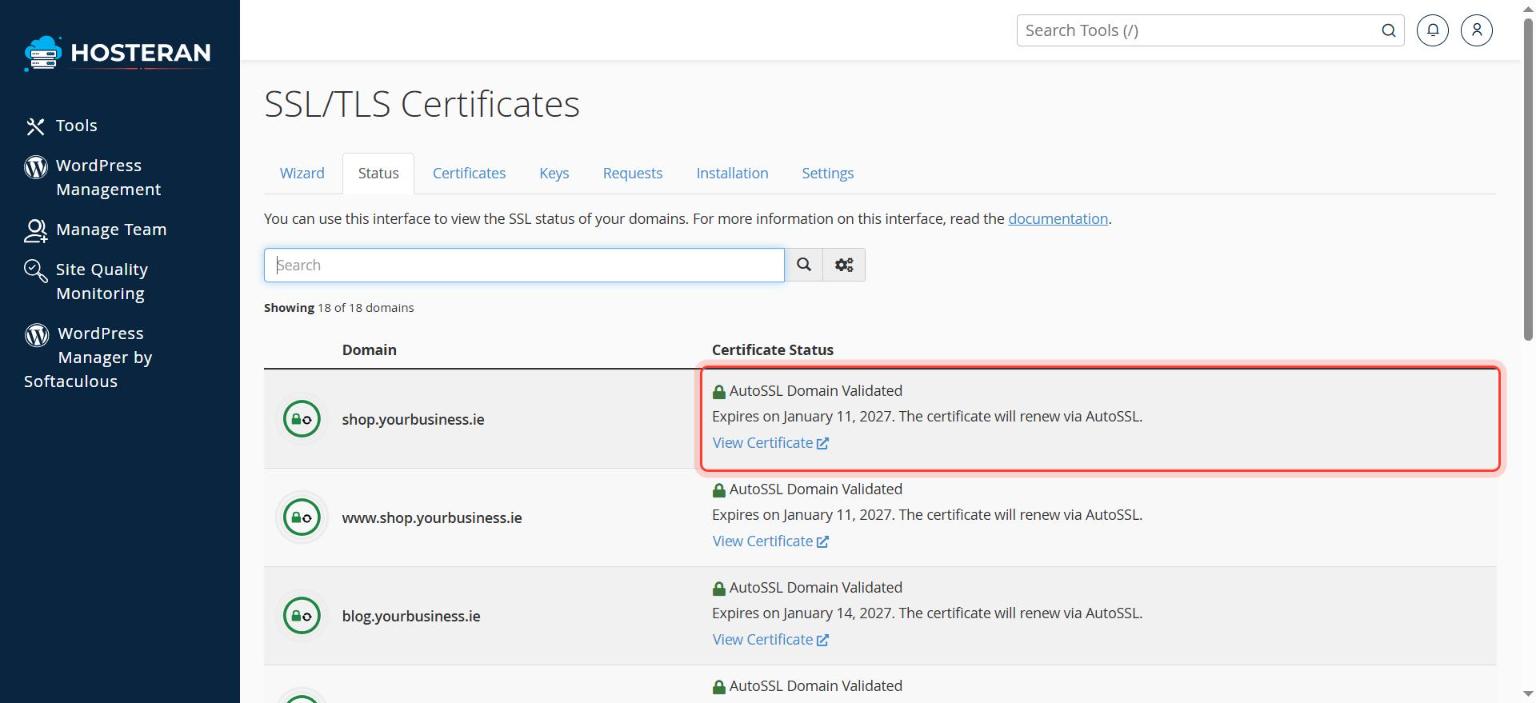
In cPanel, in the Security section, click SSL/TLS Certificates, then click the Status tab at the top.
- 2
Check the list
Each domain should show AutoSSL Domain Validated and an expiry date. The certificate renews itself automatically before it expires, so you don’t need to do anything.
- 3
Missing a certificate?
If a domain shows a red or yellow warning instead, check that it points to Hosteran (see nameservers) and wait a few hours. Still missing? Open a ticket and we’ll issue it for you, free.
- 4
Force HTTPS
In Domains → Domains, switch Force HTTPS Redirect on for your domain, so visitors always use the secure address.
Good to know
- AutoSSL only works once the domain points to Hosteran. If you’ve just changed nameservers, wait a few hours: the certificate is then issued automatically.
Stuck on a step? Open a ticket and tell us the step number.