
Knowledge base › Troubleshooting
My email isn’t sending or arriving
Simple checks for the most common email problems.
- 1
Try webmail
Log in to webmail. If email works there, the problem is the settings in your phone or Outlook: compare them with Connect Devices.
- 2
Check the password
If you recently changed the password, update it on every device.
- 3
Check the mailbox isn’t full
In Email → Email Accounts, look at the storage bar. A full mailbox can’t receive email.
- 4
Check the spam folder
Ask the sender to check their spam folder, and check yours too.
- 5
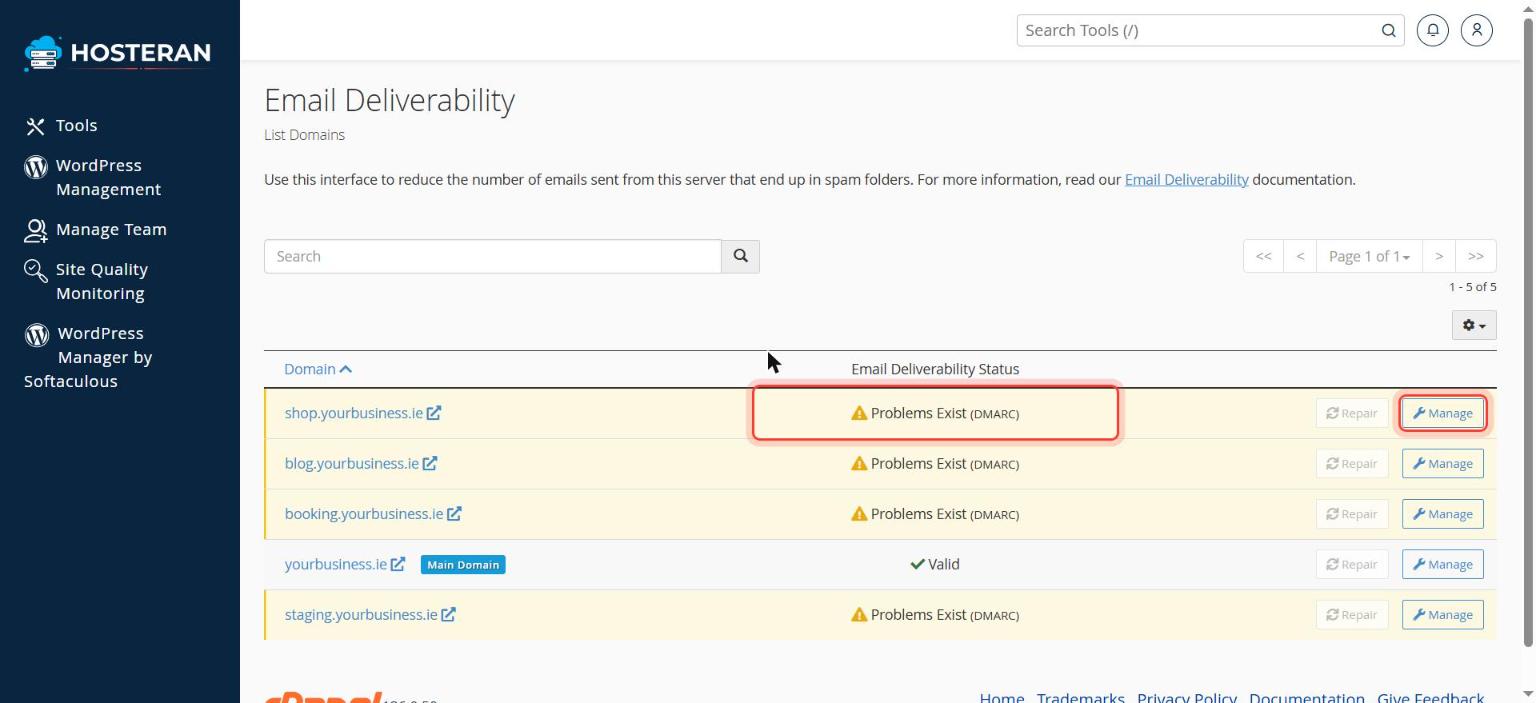
Check Email Deliverability
In cPanel, open Email → Email Deliverability. If a domain shows Problems Exist, click Manage next to it to see which record (SPF, DKIM or DMARC) needs fixing and the value cPanel suggests. When the Repair button is active, it fixes the record for you (only if your DNS is managed by Hosteran). Not sure? Open a ticket and we’ll fix it.
- 6
Contact us
Still not working? Open a ticket with the address you sent from, the recipient, the time and any bounce message.
Stuck on a step? Open a ticket and tell us the step number.